Buying guides · Guide
Check the complete MPN before requesting a quote
Use the complete manufacturer part number in your inquiry, including every suffix. A prefix helps you find possible matches; the full ordering code helps you ask about the part you actually need.
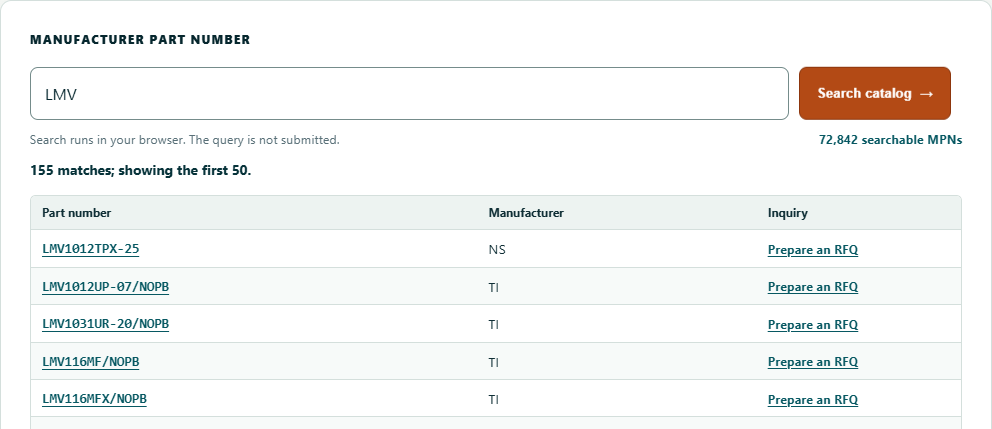
Use a prefix to find possible matches
If you know only the beginning of a part number, enter it in Part search. Full matches appear first, followed by prefix and partial matches; up to 50 results are shown.
Always read the original part number in the results. Similar-looking codes may describe different parts.
Try it: search, select and prepare your inquiry
Follow these steps to carry a part number into your RFQ.
- Open Part search and type LMV.
- Compare the complete codes in the result table.
- Select the MPN you need to open the RFQ worksheet.
- Check it against your requirement and the manufacturer ordering information.
Check the details that matter
Suffixes can describe different options depending on the manufacturer and device. Check the ordering information for the specific part rather than guessing.
| Detail | What to check |
|---|---|
| Complete MPN | Every character, including suffixes |
| Manufacturer | Ask us if the manufacturer information is missing |
| Package or grade | Applicable manufacturer documentation |
| Different suffix | Keep both codes and ask about the difference |
| Alternative part | Have suitability checked before accepting a substitute |
Ask about availability and next steps
Include the complete MPN, quantity and target date in your inquiry. Availability, price, lead time and supporting documents are confirmed for your quotation.
Check the part against your design requirements before ordering.
Related reading and tools
Explore the related VEQORIN services and practical tools below.
Questions about your requirements? Contact our RFQ desk. About our content and sources.